Now a days Most of the sign in, registration or any bank transactions happen over a OTP security (Over the air pin). So in this article we will see how to create a REST API for generating the OTP.
Going forward, we can use this APIs for the registration purpose from an Android APP. Before you go through this blog, you make sure that you have the basic knowledge of PHP, MySQL and Apache on Windows or Linux. If you are going to work on Windows you need to install WAMP or on Linux you install LAMP.
I am going to use WAMP i.e Window-Apache-MySql-PHP. Before we start, we need to have the third party SMS gateway information to send the SMS as the OTP. You can use MSG91 (http://control.msg91.com/) or sms.serverbasket (http://sms.serverbasket.com/default.asp) or any third party sms gateways. I tried with both the above mentioned gateways.
Work Flow
- User Mobile Number will be sent to our Server. If you are using this for the website, the user mobile will be sent from the website. Or if you are using this API in Mobile Application, App sends the user mobile number to our hosted Server.
- Our Server requests the SMS Gateway for an SMS to the Mobile number with a verification Code (OTP).
- SMS Gateway send the SMS with the verification code to the mobile number.
- Verification code will be sent back to the server again for verification (If it's website, user has to type it in the mentioned edit box. or if it's a app, app reads the SMS and sends back the code to the Server).
- Our server verifies the code and activates the user or take appropriate action if the code matches with the generated one.
What this tutorial covers
- Database schema for storing users and OTP codes.
- PHP code files: config.php, DbConnect.php, DbHandler.php (implementation shown below).
- How to generate and persist an OTP and send it via an SMS gateway.
This post is Part 1 — continued to part 2 for endpoint wiring and Android client examples.
Requirements
- WAMP or LAMP stack (Apache, PHP, MySQL).
- A third-party SMS gateway account (MSG91, SMS Server Basket, etc.) and its API credentials.
- Basic PHP and MySQL knowledge.
Test your local server
You can test your server by opening the address http://localhost/ in your browser or http://
Create MySql Database
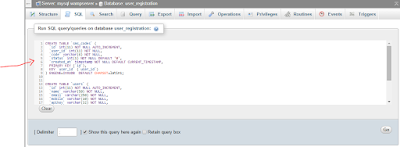
Open http://localhost/phpmyadmin and execute the below queries to create required database and tables.
Create a database named user_registration.
Once database is created, you can go to that database and click on SQL tab.
Create tables SQL
CREATE TABLE `sms_codes` (
  `id` int(11) NOT NULL AUTO_INCREMENT,
  `user_id` int(11) NOT NULL,
  `code` varchar(6) NOT NULL,
  `status` int(1) NOT NULL DEFAULT '0',
  `created_at` timestamp NOT NULL DEFAULT CURRENT_TIMESTAMP,
  PRIMARY KEY (`id`),
  KEY `user_id` (`user_id`)
) ENGINE=InnoDB DEFAULT CHARSET=latin1;

CREATE TABLE `users` (
  `id` int(11) NOT NULL AUTO_INCREMENT,
  `name` varchar(50) NOT NULL,
  `email` varchar(250) NOT NULL,
  `mobile` varchar(10) NOT NULL,
  `apikey` varchar(32) NOT NULL,
  `status` int(1) NOT NULL DEFAULT '0',
  `created_at` timestamp NOT NULL DEFAULT CURRENT_TIMESTAMP,
  PRIMARY KEY (`id`)
) ENGINE=InnoDB DEFAULT CHARSET=latin1 AUTO_INCREMENT=64 ;

ALTER TABLE `sms_codes`
  ADD CONSTRAINT `sms_codes_ibfk_1` FOREIGN KEY (`user_id`) REFERENCES `users` (`id`) ON DELETE CASCADE ON UPDATE CASCADE;


Project structure
Create directory c:\wamp\www\OTP_SMS (Windows) and inside it create an include directory. We will place configuration and DB handler files there.
Config.php
Create include/Config.php. This file contains DB constants and SMS gateway constants.
<?php
/**
 * Database configuration
 */
define('DB_USERNAME', 'root');
define('DB_PASSWORD', '');
define('DB_HOST', 'localhost');
define('DB_NAME', 'user_registration');

/**
 * MSG91 configuration
 */
// auth key
define('MSG91_AUTH_KEY', "");
// sender id should 6 character long
define('MSG91_SENDER_ID', '');

define('USER_CREATED_SUCCESSFULLY', 0);
define('USER_CREATE_FAILED', 1);
define('USER_ALREADY_EXISTED', 2);
?>
DbConnect.php
Create include/DbConnect.php. This file handles the database connection.
<?php
/**
 * Handling database connection
 */
class DbConnect {
    private $conn;

    function __construct() {
    }

    function connect() {
        include_once dirname(__FILE__) . '/Config.php';
        $this->conn = new mysqli(DB_HOST, DB_USERNAME, DB_PASSWORD, DB_NAME);
        if (mysqli_connect_errno()) {
            echo "Failed to connect to MySQL: " . mysqli_connect_error();
            exit;
        }
        return $this->conn;
    }
}
?>
DbHandler.php
Create include/DbHandler.php. This file contains the main database operations used by the REST API: creating a user, generating OTPs, checking duplicates and activating users. Below is the code provided in this article (kept intact but reorganized into copyable blocks):
<?php
/**
 * Class to handle all db operations
 * This class will have CRUD methods for database tables
 */
class DbHandler {
    private $conn;

    function __construct() {
        require_once dirname(__FILE__) . '/DbConnect.php';
        // opening db connection
        $db = new DbConnect();
        $this->conn = $db->connect();
    }

    /* ------------- `users` table method ------------------ */

    /**
     * Creating new user
     * @param String $name User full name
     * @param String $email User login email id
     * @param String $mobile User mobile number
     * @param String $otp user verificaiton code
     */
    public function createUser($name, $email, $mobile, $otp) {
        $response = array();
        // First check if user already existed in db
        if (!$this->isUserExists($mobile)) {
            // Generating API key
            $api_key = $this->generateApiKey();
            // insert query
            $stmt = $this->conn->prepare("INSERT INTO users(name, email, mobile, apikey, status) values(?, ?, ?, ?, 0)");
            $stmt->bind_param("ssss", $name, $email, $mobile, $api_key);
            $result = $stmt->execute();
            $new_user_id = $stmt->insert_id;
            $stmt->close();

            // create OTP for new user
            $otp_result = $this->createOtp($new_user_id, $otp);

            if ($result) {
                // User successfully inserted
                return USER_CREATED_SUCCESSFULLY;
            } else {
                // Failed to create user
                return USER_CREATE_FAILED;
            }
        } else {
            // User with same mobile already existed in the db
            return USER_ALREADY_EXISTED;
        }

        return $response;
    }

    public function createOtp($user_id, $otp) {
        // delete the old otp if exists
        $stmt = $this->conn->prepare("DELETE FROM sms_codes where user_id = ?");
        $stmt->bind_param("i", $user_id);
        $stmt->execute();

        // insert new otp
        $stmt = $this->conn->prepare("INSERT INTO sms_codes(user_id, code, status) values(?, ?, 0)");
        $stmt->bind_param("is", $user_id, $otp);
        $result = $stmt->execute();
        $stmt->close();
        return $result;
    }

    /**
     * Checking for duplicate user by mobile number
     * @param String $mobile
     * @return boolean
     */
    private function isUserExists($mobile) {
        $stmt = $this->conn->prepare("SELECT id from users WHERE mobile = ? and status = 1");
        $stmt->bind_param("s", $mobile);
        $stmt->execute();
        $stmt->store_result();
        $num_rows = $stmt->num_rows;
        $stmt->close();
        return $num_rows > 0;
    }

    public function activateUser($otp) {
        $stmt = $this->conn->prepare("SELECT u.id, u.name, u.email, u.mobile, u.apikey, u.status, u.created_at FROM users u, sms_codes WHERE sms_codes.code = ? AND sms_codes.user_id = u.id");
        $stmt->bind_param("s", $otp);
        if ($stmt->execute()) {
            $stmt->bind_result($id, $name, $email, $mobile, $apikey, $status, $created_at);
            $stmt->store_result();
            if ($stmt->num_rows > 0) {
                $stmt->fetch();
                $this->activateUserStatus($id);
                $user = array();
                $user["name"] = $name;
                $user["email"] = $email;
                $user["mobile"] = $mobile;
                $user["apikey"] = $apikey;
                $user["status"] = $status;
                $user["created_at"] = $created_at;
                $stmt->close();
                return $user;
            } else {
                $stmt->close();
                return NULL;
            }
        } else {
            return NULL;
        }
    }

    public function activateUserStatus($user_id){
        $stmt = $this->conn->prepare("UPDATE users set status = 1 where id = ?");
        $stmt->bind_param("i", $user_id);
        $stmt->execute();
    }

    public function updateOtpStatus($user_id){
        $stmt = $this->conn->prepare("UPDATE sms_codes set status = 1 where user_id = ?");
        $stmt->bind_param("i", $user_id);
        $stmt->execute();
    }

    /**
     * Generating random Unique MD5 String for user Api key
     */
    private function generateApiKey() {
        return md5(uniqid(rand(), true));
    }
}
?>
Note: The code above uses prepared statements. Keep these files under the
includefolder.
Important production & security considerations (must read)
This tutorial provides a starting implementation. Before using any OTP system in production, consider the following:
- Always use HTTPS/TLS for API endpoints — never send OTPs or credentials over plaintext HTTP.
- OTP lifetime: set a short expiry (e.g., 2–10 minutes). The sample schema stores created_at; enforce expiry when validating OTPs.
- Do not reuse OTPs — generate cryptographically secure random codes (use random_int) and mark them used or expired after verification.
- Store OTPs securely. Prefer storing a HMAC or salted hash of the OTP rather than the plain code so a DB breach doesn't leak codes.
- Rate limiting and brute‑force protection: limit OTP requests per number/IP and block after N incorrect attempts.
- Reuse and concurrency: delete or invalidate older OTPs (example deletes old OTPs before inserting a new one).
- Logging and monitoring: track failed verifications and unusual request rates.
- Validate input on server side (mobile number format, lengths) and sanitize all inputs.
- Handle SMS gateway failures (retry policy, queueing, and reporting to user).
- Consider user privacy and data regulations in your jurisdiction when storing mobile numbers and logs.
API endpoints (recommended examples)
Example endpoints you will implement (this post prepares the backend code; wiring endpoints and request handling may be in Part 2):
- POST /register — register a user and send OTP via SMS
- Request (JSON): {"name":"John Doe","email":"john@example.com","mobile":"9876543210"}
- Response: 201 Created or error code and message
- POST /verify — verify OTP and activate user
- Request (JSON): {"mobile":"9876543210","otp":"123456"}
- Response: 200 OK and user details or 401 Unauthorized
Always return appropriate HTTP status codes and JSON payloads.
SMS gateway integration (high level)
Use your gateway's HTTP API (example: MSG91). When you call the gateway: handle success and failure, check rate limits, and log gateway responses. The exact request depends on your provider — consult the vendor docs.
Testing and next steps
- Run the SQL to create tables in phpMyAdmin (screenshots above show the UI flow).
- Place PHP files under
OTP_SMS/include/and test script flows locally (use Postman/cURL to call endpoints). - Implement Part 2 to wire endpoints, add input validation, and include example HTTP requests and Android client code.
References & links
- MSG91: http://control.msg91.com/
- SMS Server Basket: http://sms.serverbasket.com/default.asp
- Installing WAMP (referenced earlier): http://karjol-gt.blogspot.in/2016/01/installing-wamp-server.html
Continued to part -2
No comments:
Post a Comment